
CloudFire App Manage your fire systems, wherever you are

See every event, the moment it happens

When a fire alarm activates, or something goes wrong, you don’t have the luxury of time.

You need to act, now. The CloudFire App puts the power in your hands, delivering all the features of CloudFire in the palm of your hand. It gives you access live fire system data, giving you instant visibility of your alarms, faults and system events, even if you’re at home.

Whether you’re responsible for one building or an entire portfolio, you can see exactly what’s happening in real time. It’s the most convenient, most accessible way to manage modern fire systems.

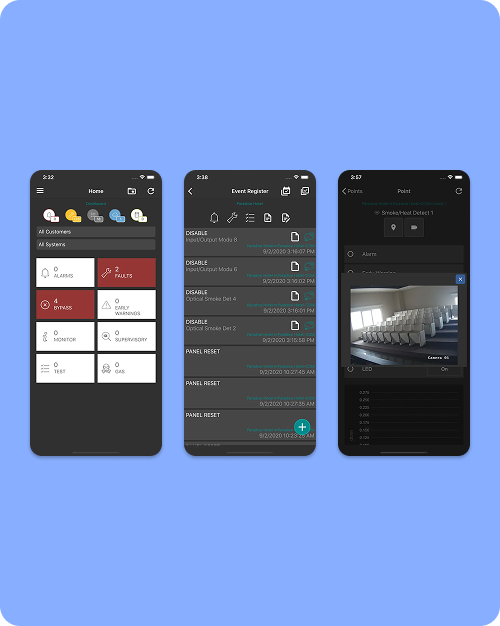
Stay informed, respond faster, be compliant

The CloudFire App gives you complete control of your fire systems, even when you’re off site.

See live fire system activity as it happens

Receive instant alerts for alarms, faults and critical events

Respond faster with real-time system visibility

Keep accurate digital records of maintenance and testing

Reduce unnecessary site visits through remote oversight and control

Here’s what you can do with CloudFire App

CloudFire features live system

Live System Overview

Feature

Instant access to system status.

What it does

Displays live information from connected fire detection, sprinkler and suppression systems.

Why it matters

Gives you immediate clarity on system performance without needing to be on site.

CloudFire features alert

Real-Time Alerts

Feature

Push notifications for alarms and faults.

What it does

Sends instant notifications to your device when system events occur.

Why it matters

You know about problems the moment they happen, not after the fact.

CloudFire features history

Complete Event History

Feature

Detailed logs and system records.

What it does

Captures alarms, faults, maintenance activity and notes in one place.

Why it matters

Keeps a clear, traceable record that supports compliance and accountability.

CloudFire features testing

Guided Testing

Feature

Assisted walk test functionality.

What it does

Guides you through testing procedures and records results digitally.

Why it matters

Reduces the risk of missed devices and simplifies compliance checks.

CloudFire features mapping

Interactive System Maps

Feature

Visual system mapping.

What it does

Shows zones, detectors and devices within an interactive building layout.

Why it matters

You can instantly see where an issue is, not just that one exists.

CloudFire features video vertifcation

Video Verification

Feature

Integrated video support.

What it does

Links system alerts with connected cameras for real-time visual confirmation of a fire event.

Why it matters

Helps you assess incidents quickly and respond confidently.

Frequently Asked Questions

What is the CloudFire App?

The CloudFire App is a mobile fire alarm monitoring app that gives you real-time access to fire system data, including alarms, faults and system events, directly from your phone or tablet.

How does the CloudFire App work?

The app connects to the CloudFire platform, which collects live data from your fire detection, sprinkler and suppression systems. Once connected, you can view system status, receive alerts and track activity in real time from anywhere.

Who is the CloudFire App designed for?

Engineers, installers, facilities managers and responsible persons use the CloudFire App to monitor fire systems and respond quickly to events, especially when managing multiple sites or working off site.

Can I monitor multiple buildings from the CloudFire App?

The app allows you to view fire system data from any building connected to the CloudFire platform.

This means you can monitor alarms, faults and system activity across an entire portfolio from one place, without switching between systems or visiting each site.

What kind of alerts does the CloudFire App send?

The CloudFire App sends instant push notifications for alarms, system faults and key events. These alerts are delivered in real time, helping you stay informed and respond quickly when something changes.

How quickly will I be notified of a fire alarm or fault?

Notifications are sent as soon as the system detects an event.

In practice, this means you’re aware of alarms or faults the moment they happen, rather than finding out later during inspections or reports.

Can the CloudFire App help reduce site visits?

Remote access to system data allows many issues to be reviewed without travelling to site.

Engineers can assess alarms, check system status and review event history directly from the app, reducing unnecessary callouts and saving time.

Does the CloudFire App support fire safety compliance?

The app records system activity, maintenance logs and testing information in a structured digital format.

These records create a clear audit trail that can support inspections, demonstrate compliance and help maintain accurate system documentation over time.

What information can I see in the CloudFire App?

You can view live system status, alarms, faults, event history, device information and maintenance records.

Everything is presented in a clear interface so you can quickly understand what’s happening across your fire systems.

Can I carry out testing using the CloudFire App?

Guided walk test functionality allows you to carry out system testing directly through the app.

The process is structured and recorded digitally, helping ensure no devices are missed and creating a reliable record of testing activity.

How does the CloudFire App improve response times?

Immediate visibility of system events means you can act as soon as something happens.

Instead of waiting for reports or on-site checks, you can investigate and respond straight away, reducing risk and improving overall system management.

What is the difference between CloudFire and the CloudFire App?

CloudFire is the central monitoring platform that collects and processes fire system data.

The CloudFire App provides mobile access to that data, allowing you to monitor and manage fire systems from anywhere without needing to log in via a desktop interface.